FAQs: Edges
Where can I view the interaction Fax Analytics?
You can find the interaction Fax Analytics in the Interactions view.
Note: Under the Available columns section, you can view the list of available column names and their descriptions. If you cannot find a column in the table, in the search bar, enter the name of the column to view its name and description.
For example, under the Available columns section, in the Interactions section’s search bar, search Fax to view the Fax column and its description.
Does Genesys still sell hardware products for use in Genesys Cloud?
No. Genesys decided to exit the hardware resale business and no longer sells BYOC Premises Edge devices or phones. Genesys now has a partnership with Arrow Electronics through which customers and partners can purchase BYOC Premises Edge devices built on the HPE and AdvanTech platforms as well as IP phones from AudioCodes and Poly. To view the available hardware products, visit the Genesys/Arrow Electronics page.
For more information, see the FAQ section of the End of Sale Advisory Genesys Hardware products all Genesys Platform document.
Do BYOC Premises Edges have a built-in load balancing feature to distribute inbound calls among multiple Edges?
No, BYOC Premises Edges do not have a built-in load balancing feature.
While the premises-based Edges have a built-in redundancy feature that does involve the call distribution, it is not the same as a load balancing. For more information, see BYOC Premises Edge redundancy.
When load balancing inbound calls among your Edges, you want to work with your carrier or configure your SBC to distribute all the inbound calls among all your Edges. Doing so allows you to take full advantage of each of the Edge’s call capacity.
If you only route calls to a single Edge, once that Edge reaches its call capacity limit, it will not be able to handle any more inbound calls. This means that you won’t be able to receive any new calls even though your other Edges have available capacity.
For example, suppose that you have three Edges. If you only route calls to Edge A, then Edge A receives and directs the call to the appropriate station. If that station’s primary is Edge B, then Edge B handles the call. However, since the call path originated with Edge A, that means that Edge A will be a part of the call path for the duration of the call. So even though the station handling the call is on Edge B, Edge A is still tied up with the call. If Edge A reaches its call capacity limit, neither Edge B nor Edge C will be able to receive calls even though they have available capacity.
So, to load balance incoming calls, your carrier or SBC needs to distribute inbound calls among all of your Edges.
What SIP RFCs does Genesys Cloud support?
Genesys Cloud supports a number of SIP RFCs. You can find a complete list in either of the following articles:
Can you configure a BYOC Premises Edge to respond to a SIP OPTIONS Ping from an SBC/Proxy?
The ability to respond to a SIP OPTIONS Ping from an SBC/Proxy is a built-in feature of a BYOC Premises Edge. There is no setting to configure as this capability is enabled by default.
A premises-based Edge is designed to respond with a 200 OK to OPTIONS messages, as long as the IP address of the SBC/Proxy sending the OPTIONS is in the Allow the Following Addresses setting under SIP Access Control in the External Trunk configuration. For more information, see External trunk settings.
Note: If the Edge is Out of Service or the Trunk is Disabled, it would not return the 200 OK, which indicates that the connection is down.
Will the Edge accept the Inbound Call in E.164 number format without the leading plus sign (+)?
Yes. If the site is configured with the default numbering plans, the Edge will accept the number and then normalize it to the E.164 number format (with the ‘+’).
Do out of service BYOC Premises Edges receive automatic Edge software updates?
Yes. BYOC Premises Edges in the Out-Of-Service state still receive automatic software updates. Automatic Edge software updates only require that the Edge is online.
What is a BYOC Premises Edge group?
An Edge group is a set of BYOC Premises Edge devices that are directly connected to one another over a high-bandwidth and low-latency network. The purpose of an Edge group is to allow all Edges in the group to access and share trunks connected to other Edges in the Edge group. For more information, see BYOC Premises Edge groups overview.
How long does it take a BYOC Premises Edge to reboot?
A BYOC Premises Edge takes an average of between five to fifteen minutes to reboot.
How do I locate a BYOC Premises Edge IP address?
To find a premises-based Edge’s IP address:
- Click Admin.
- Under Telephony, click Edges.
- Click Menu > Channels > Telephony > Edges.
- Click the appropriate Edge name.
- Click the Network Interfaces tab.
- Navigate to the first active interface and look for the IP address on the first tab.
How can I determine which BYOC Premises – Genesys Hardware Solution Edge is powering my BYOC Premises configuration?
There are five Edge versions that you can be using in a BYOC Premises – Genesys Hardware Solution organization:
- Edge Standard v1
- Edge Standard v2
- Edge Standard v3
- Edge Mini
- Edge Micro
The v1 is a custom server built by Genesys. The v2 and v3 are built on Hewlett Packard system and customized to Genesys Cloud specifications. The Mini and Micro are built on an Advantech system and customized to Genesys Cloud specifications. For more information, see About BYOC Premises – Genesys Hardware Solution.
You can identify the version of an Edge by the serial number.
To find the serial number:
- Click Admin.
- Under Telephony, click Edges.
- Click Menu > Digital and Telephony > Telephony > Edges.
- Select the check box for the row that contains the Edge you want identify.
- Click Edit Edge on the toolbar.
- On the General tab, locate the information panel, and find the Serial Number.
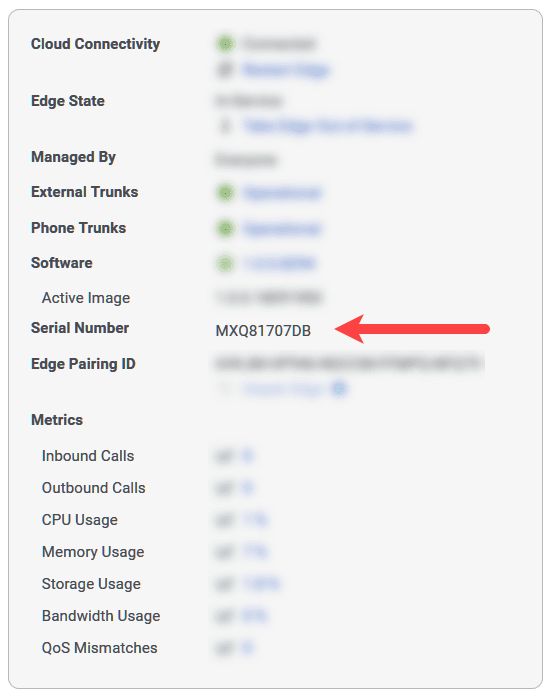
Edge standard
If the serial number begins with the letters CCP, then it is a Edge Standard v1. If the serial number begins with any other letters or numbers, then it is either an Edge Standard v2 or an Edge Standard v3.
To determine whether it is a Standard v2 or a Standard v3:
- Take note of the serial number.
- Access the Hewlett Packard Enterprise Support Services Central site.
- Enter the serial number when prompted.
If the result is HPE DL60 Gen9, then you have a Edge Standard v2.
If the result is HPE DL360 Gen10, then you have a Edge Standard v3.
Edge Mini or an Edge Micro
If the serial number begins with the letters KSA or ACG, then it is either an Edge Mini or an Edge Micro. Unfortunately, you can’t actually differentiate the Edge Mini and the Edge Micro from the serial number. To tell them apart, you have to have physical access to the device.
The Edge Mini and the Edge Micro are physically identical in that they both use the same chassis, so telling them apart depends on when they were manufactured.
In some cases, you can tell them apart by the model number found on the sticker on the bottom of the chassis.
- If the model number is ARK-1550-S9A1E, then you have an Edge Mini.
- If the model number is ARK-1550-S6A1E, then you have an Edge Micro.
If the model numbers do not correspond to this scheme, the only way to distinguish between them is by the size of the hard disk. The Edge Micro has a 256 GB hard disk while the Edge Mini has a 512 GB hard disk. You can slide out the externally removable solid-state drive to examine them.
Genesys recommends labeling the Mini and Micro Edges when you receive them.
An agent ended the interaction, but the disconnect reason says end-user. Why?
If the agent ended the interaction from a headset instead of the Genesys Cloud user interface, then the disconnect reason can appear as “end-user” because the system interprets the disconnect request as coming from an outside source.
Does Genesys Cloud require a SIP proxy between a BYOC Premises Edge and SIP provider?
Yes, in some cases. No, in other cases. Whether Genesys Cloud requires a SIP proxy between a BYOC Premises Edge and SIP provider depends on capabilities of the SIP provider. See Eliminate the SIP proxy between a BYOC Premises Edge and SIP provider.
How do I replace a BYOC Premises Edge?
To replace a hardware-based BYOC Premises Edge, see Replace a BYOC Premises Edge.
How are faxes sent and received in Genesys Cloud?
When a user sends a fax, Genesys Cloud converts the file to TIF file format and sends it to the appropriate device depending on your telephony connection. If you are using BYOC Premises, that location is an onsite edge device. If you are using either BYOC Cloud or Genesys Cloud Voice, that location is a cloud media device.
The device then sends the file to the user-entered number using your SIP trunks. If the file did not originate in Documents, Genesys Cloud also stores the original file in its original format in the user’s workspace in Documents. For information about how to send a fax from Genesys Cloud, see Send a fax.
Since a user has the same number for both incoming calls and faxes, the device must detect whether an incoming call is a voice call or fax. If fax detection is enabled and the device detects incoming fax tones, it negotiates the T.30 transmission, receives the image data, and sends the file to Genesys Cloud in TIF format. Genesys Cloud then converts the TIF file to a PDF file and sends it to both the user’s inbox and workspace in Documents. For information about how to view received faxes in Genesys Cloud, see View faxes in the inbox.
- Genesys Cloud supports faxing the following file types: .tiff, .pdf, .doc, .docx, and .odt.
- Genesys Cloud supports fax documents of up to 100 pages and 10 MB. If you must send a longer document, Genesys recommends that you divide the document into smaller parts.
- Documents to be faxed cannot be password-protected.
How does phone redundancy work?
Genesys Cloud phone redundancy operates as an active-active configuration. When a phone provisions and gets its configuration from an Edge, it registers simultaneously to both homed Edges. Once the phone has registered to both Edges, it uses the primary Edge to place and receive calls. If the connection between the primary Edge and the phone goes down, calls switch to the secondary Edge. It does not matter whether the call is made from the Genesys Cloud user interface or from a hardware phone. Both calls operate in the same manner. All SIP and Media signaling also switches to the secondary Edge. When the primary Edge does come back online, all signaling switches back to the primary Edge.
For more information see:
What if my carrier does not support the E.164 international numbering plan?
Genesys Cloud can transform the calling and called party numbers sent on an outbound call into an acceptable format for carriers that do not accept E.164. For more information, seeTransform the outbound address with regular expressions.
How do I download logs for support from an offline BYOC Premises Edge?
To export logs from an offline BYOC Premises Edge to a USB flash drive, use the external LCD menu and follow the path Settings > Diagnostics > Copy Today’s Logs to E:.
If you do not have an external LCD, you can still copy log files to a USB flash drive. To do so:
- Create a folder path on your USB drive in the format: \EDGELOGS\YYYY-MM-DD.
- For example, E\EDGELOGS\2023-01-23.
- Insert the USB flash drive into the Edge.
If log files with that date are present on the Edge, they will be automatically copied to the USB flash drive.
Why are calls not recording?
Call recording requires that Line Recording is enabled on the SIP trunk by a telephony admin. Complete the Enable recording on the trunk procedure.